|
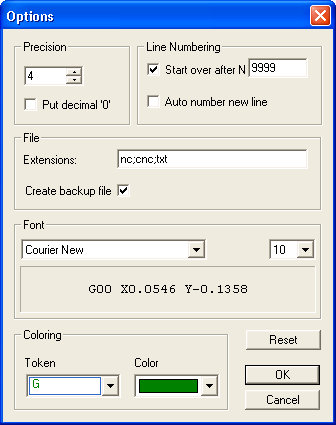
The Options dialog allows the user to customize the CNC editor in the following ways:
The Precision control sets the number of decimal places in the product of the "Scale" function. Checking the Put Decimal 0 box inserts trailing zeros in the values.
The Start over after Nnnnn allows the user to set the maximum block number for renumbering.
A check in the Auto Number new line box means that as a new line is written to the end of the file, a block number will automatically be included. Uncheck the box to disable automatic line numbering.
The Font frame gives the user a choice of fonts with which to display and print files. Use the controls in the Coloring frame to set the syntax colouring for various text groups in the program. Uncommon codes, such as a "G" word with a decimal point, or a letter "O" instead of numeral "0" will be coloured red.
A check beside Create backup file will create a file of the same name as the active file, but with the extension .bak, each time a file is saved. This will give the user a copy of the file as it was before the most recent editing.
The user may list commonly used file extensions in the Extensions text box. These will appear in the file type drop-down in the File Open and File Save dialogs of EditCNC.
|
